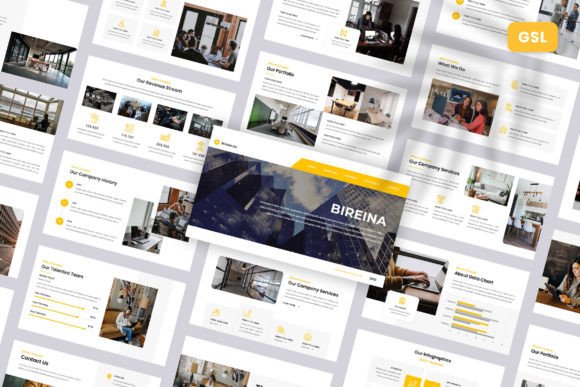
Bireina Business Google Slides: A Template for Modern Storytelling
Let's be honest: the default templates in most presentation software feel tired before you even add your first bullet point. They lack personality, often pushing your unique message into a generic, forgettable mold. For professionals and creatives who need to make an immediate impact, the visual foundation of your slides is as critical as the content itself. This is where the Bireina – Business Google Slides template shifts the dynamic. It’s not just a collection of pre-made slides; it’s a structured design system built to frame your ideas with clarity and contemporary style.
At its core, Bireina presents a clean, modern aesthetic. It avoids the trap of over-designed elements, instead relying on strong geometric layouts, a balanced use of white space, and a sophisticated typographic hierarchy. The personality is confident and professional, yet approachable. It doesn’t shout for attention with flashy animations but commands it through intelligent composition and visual rhythm. The 16:9 widescreen ratio is utilized to its full advantage, giving each slide a cinematic, expansive feel that’s ideal for today’s high-resolution displays. This isn’t a template that will fight your brand identity; it’s a versatile canvas designed to amplify it.
Where Your Narrative Finds Its Stage
The true test of any design asset is its adaptability. The Bireina – Business Google Slides template excels precisely because it’s built for a spectrum of real-world applications. Imagine a Creative Agency pitching a bold new campaign. The template’s structured grids and ample image placeholders allow them to showcase their portfolio work with the emphasis it deserves, turning a pitch into a visual story. For a Company Profile or Corporate and Business presentation, Bireina provides the orderly framework needed to communicate complex information—financials, timelines, org charts—with digestible clarity, projecting the professionalism stakeholders expect.
It transitions seamlessly into more personal or agile contexts. A Startup can leverage its clean slides to articulate a vision to investors, where every pixel of screen real estate counts. Portfolio and Photography presentations benefit from the template’s restraint, allowing your work to become the hero element. The Pitch Deck becomes a persuasive narrative tool, not just a data dump. Even for a Personal Portfolio, the template’s modern typography and balanced layouts help you present your skills and projects with a level of polish that stands out in a crowded job market. The “Just Drag and Drop” and “Easily Editable” features are practical lifesavers here, acknowledging that your time is better spent refining your message than wrestling with software.
The Engine of Visual Communication
A presentation’s power lies in its ability to guide the viewer’s eye and mind. Bireina’s design directly influences this visual hierarchy. The consistent use of font weights, sizes, and strategic placement creates a clear path through your information. This isn’t just about looking good; it’s about enhancing comprehension and readability. When your audience isn’t struggling to parse a cluttered slide, they can focus on your core message, leading to better audience engagement and retention.
The template’s foundation on Master Slides is a critical, often overlooked, feature for maintaining brand consistency. By editing the master, you ensure that every slide in your deck adheres to your brand identity—from color palettes to footer placement. This builds recognition and reinforces a sense of cohesion and professionalism throughout your entire presentation. The inclusion of resizable and editable graphics means you’re not locked into a single icon set or illustration style; you can adapt every element to match your brand’s specific visual language.
While the template uses recommended free web fonts (ensuring you won’t face licensing headaches), the real value is in its typographic system. It demonstrates effective font pairing—how a clean sans serif font for headlines can work with a highly legible serif or sans serif for body text to create contrast and flow. Studying this can inform your broader marketing and web design projects, providing a practical lesson in modern typography.
Integrating Bireina into Your Workflow
Adopting a new template should feel like gaining a collaborator, not a constraint. Start by evaluating the 30 included slides not as fixed pages, but as modular components. Which layouts best serve your standard presentation types? A project kickoff might use the timeline and team slides heavily, while a creative review might focus on the image-centric and quote layouts.
Before committing your final content, test the template with a small subset of your data. Does the visual weight of the slides balance with your text volume? Are the image placeholders positioned to complement your key visuals? This testing phase is where you move from using a template to mastering it. The documentation file included with Bireina – Business Google Slides is your key here—it can unlock shortcuts and customization techniques you might otherwise miss.
Remember, this template is a starting point for your brand identity in presentation form. Swap the placeholder images for your own high-quality photography or graphics. Adjust the color theme to match your brand palette. The goal is to make the template disappear, leaving only the clear, compelling expression of your idea. Whether you’re a blogger outlining a new series, a marketer presenting campaign results, or a small business owner seeking a loan, Bireina provides the structured, premium visual foundation you need to tell your story with confidence and impact.