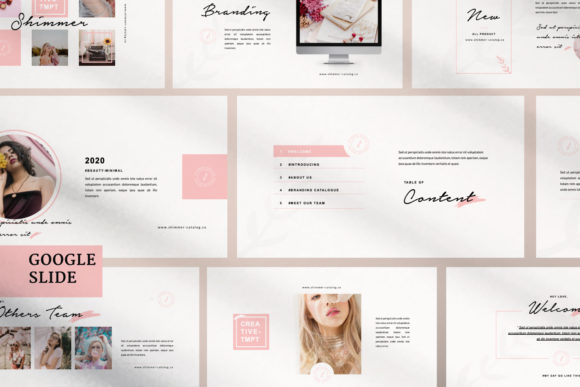
Shimmer Creative Google Slide: Elevating Your Presentations
When you're standing in front of a room—whether it's a boardroom, a conference stage, or a virtual screen—your slides are doing more than just carrying information. They're setting the tone, building trust, and shaping how your audience receives your message. A cluttered, generic template can undermine even the strongest content. That's where Shimmer Creative Google Slide steps in, offering a design framework that feels intentional, polished, and genuinely modern.
A Template Built with Real Attention to Detail
Shimmer Creative Google Slide isn't just another multipurpose presentation template thrown together with placeholder boxes. Each slide has been crafted with a clear sense of visual rhythm, balancing negative space with structured content areas in a way that feels both contemporary and professional. The ultra-modern aesthetic leans into clean geometry, subtle gradients, and thoughtful typography choices—giving your presentations an edge without sacrificing clarity.
The 16:9 aspect ratio ensures your slides look sharp on modern displays, from widescreen monitors to projector setups. And because the template uses SlideMaster functionality, customizing it is refreshingly straightforward. You drag and drop your images into the placeholders, adjust the text, and you're working with a design that looks like you hired a professional agency. For entrepreneurs, marketers, and content creators who don't have hours to spend on slide design, this kind of efficiency matters.
Where This Presentation Template Shines
The versatility of Shimmer Creative Google Slide is one of its strongest qualities. It's genuinely multipurpose, which means you're not locked into a single use case. Here's where I've seen templates like this deliver the most impact:
- Business Pitches and Investor Decks: The professional polish helps establish credibility quickly. When your slides look sharp, people assume your business operations match that standard.
- Portfolio Presentations: Designers, photographers, and creative professionals can showcase work in a layout that complements rather than competes with their projects.
- Corporate Branding Overviews: The many layout variations make it easy to present brand guidelines, color palettes, and visual identity systems in a structured, digestible format.
- Marketing and Advertising Campaigns: Whether you're presenting a social media strategy or a product launch plan, the template's modern typography and clean hierarchy keep your audience focused.
- Educational and Workshop Content: Bloggers, publishers, and educators can use the varied slide layouts to break down complex topics without overwhelming their audience.
Small business owners, in particular, benefit from having a template that bridges the gap between DIY and professional design. You don't need a design background to make these slides look good—the structure does the heavy lifting.
How Design Quality Influences Audience Perception
There's a reason why brand identity work often starts with visual systems. The way information is presented shapes how people interpret it. A presentation built on Shimmer Creative Google Slide communicates competence and care before you've even spoken a word. The layout variations create natural visual hierarchy—guiding the viewer's eye from headline to supporting detail without confusion.
This matters more than most people realize. In marketing and advertising contexts, slides that feel cohesive and well-designed increase audience engagement. People stay attentive longer. They trust the content more readily. And they remember the key points because the visual structure supports retention rather than hindering it.
The template also supports consistency across your brand touchpoints. If you're using the same design language in your presentations, social media graphics, and web design, your audience starts recognizing your visual style. That kind of recognition builds over time and contributes directly to how professional and trustworthy your brand appears.
Practical Guidance for Getting the Most from This Template
Before committing to any design asset, it's worth evaluating whether it fits your specific needs. Here are a few practical recommendations:
- Test with Your Actual Content: Drop in your real images, your real text, and your brand colors. A template that looks great in preview might need adjustments once your content is in place. The easy color change feature in Shimmer Creative makes this process smooth.
- Evaluate the Layout Variations: The template includes many layout and text variations, which is valuable. Make sure the specific slides you need—whether that's a data-heavy chart slide or a full-bleed image slide—are well represented.
- Consider Your Audience's Expectations: A creative agency pitch calls for different energy than a quarterly business review. This template leans modern and creative, so it works beautifully for branding, advertising, and portfolio presentations. For very traditional corporate settings, you might need to adjust the styling slightly.
- Check Font and Color Flexibility: Since the template is fully editable, you can align it with your existing brand identity. Swap out fonts and colors to match your guidelines—this keeps your presentation consistent with your broader design assets.
- Use the Business Guidelines Pages: If you're presenting brand work, these dedicated slides save significant time. They're structured to display visual identity elements clearly, which is something many generic templates overlook.
One thing worth noting: the preview images shown in the template demo aren't included in the main file. This is standard practice, but it means you'll need your own photography or stock images ready. Having quality visuals prepared in advance makes the customization process much faster.
Making the Template Work for Your Brand
The real value of a multipurpose creative template like Shimmer Creative Google Slide isn't just that it looks good—it's that it gives you a reliable foundation for every presentation you create. Instead of starting from scratch each time, you have a system. Consistent layouts, professional spacing, and thoughtful design choices become the baseline rather than something you're scrambling to achieve.
For content creators, crafters, and hobbyists who present at workshops, markets, or online events, this kind of template bridges the gap between passion and professionalism. Your work deserves to be shown in a context that respects its quality. And for marketers and brand strategists managing multiple clients or campaigns, having a template that adapts to different visual identities without losing its structural integrity is a genuine time-saver.
The free support included with the template is a practical bonus. If you run into customization questions or technical issues, having access to help means you're not stuck troubleshooting on your own. That kind of support structure makes a difference, especially when you're working against a deadline.
Ultimately, presentations are about communication. The best design choices are the ones that make your message clearer, your brand stronger, and your audience more engaged. Shimmer Creative Google Slide delivers on all three fronts—and it does so with a level of design care that you can feel in every slide.